A satellite project of labs.iximiuz.com - an indie learning platform to master Linux, Containers, and Kubernetes the hands-on way 🚀
Connect to a Playground Kubernetes Cluster with Local kubectl and MCP Servers
|
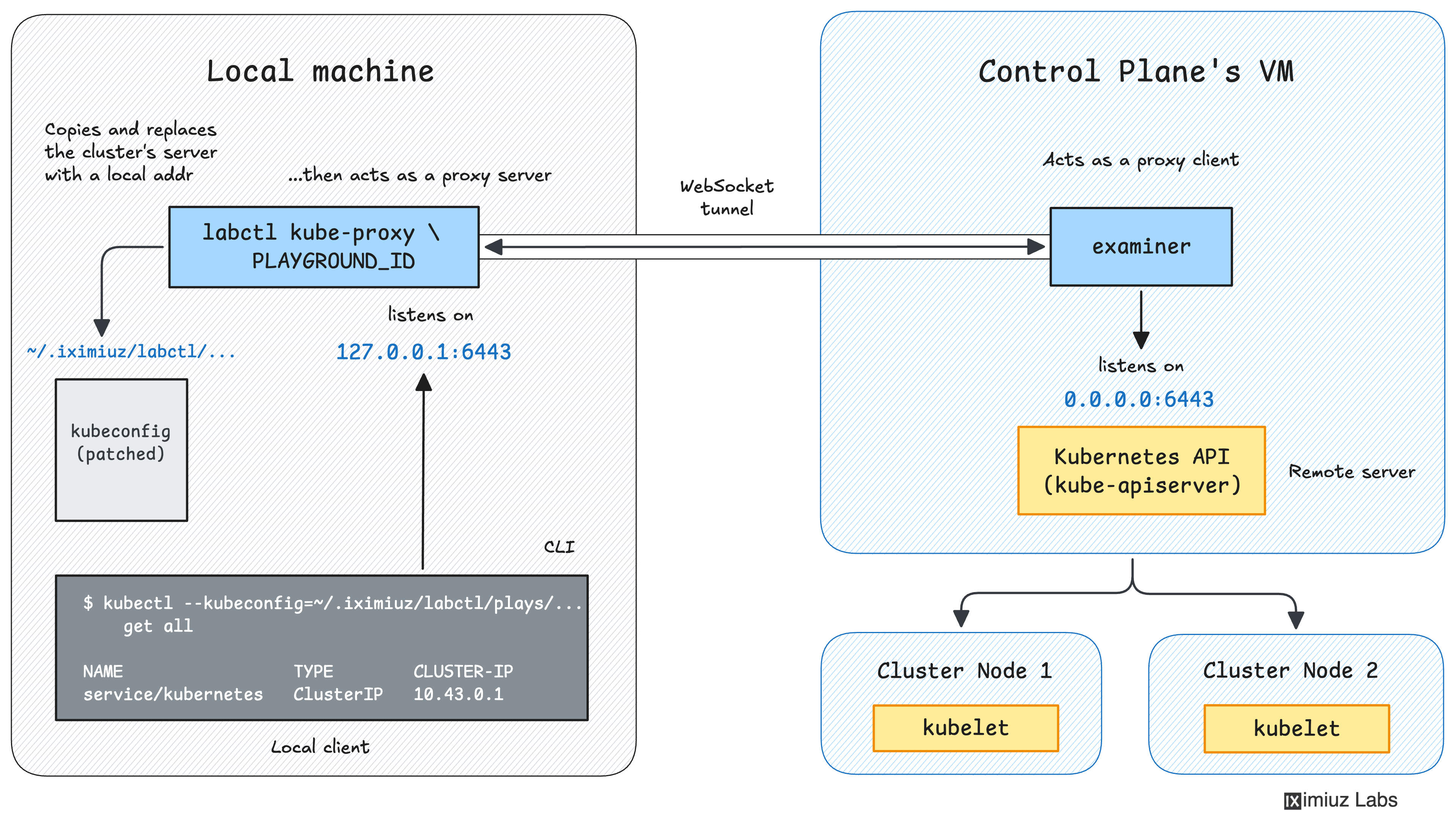
Hello, fellow Kubernetes enthusiast 👋 Have you ever wanted to access a cluster started in a playground using your local tooling? Lens comes to mind first, but just being able to use your local Connect to a Playground Kubernetes ClusterPlayground Kubernetes clusters run inside remote VMs, so My rule of thumb is that a feature is worth implementing when I'm asked about it at least a few times a week, and that finally happened with remote cluster access. Behold:
This new command, introduced in the 0.1.73 labctl release, helps you access a playground Kubernetes cluster from your local machine by automating the above steps and then printing the exact Check this short playground recipe for a working example.
Use Local and Remote Kubernetes MCP ServersIf you want to experiment with cluster management via Claude Code (or any other agent that supports MCP), I've got a new playground recipe that shows how to do it using Red Hat's Kubernetes MCP server. I recommend running Claude Code and the Kubernetes MCP server inside the playground VM. This will mean neither the agent nor the MCP server can access your local filesystem or credentials, which is always a good thing. 1. Start a Kubernetes playground and SSH into it:
2. Install Claude Code and log in:
3. Add the Kubernetes MPC server:
4. Test it:
As simple as that! And if you really want to try using your local Claude Code to manage remote clusters, the recipe has the second part, which builds on the just added Wrapping upHappy hacking! Ivan P.S. The 40% off pricing pilot is still on. Support iximiuz Labs and get twice bigger playgrounds with up to 24h uptime and full access to the official content collection. |
Ivan on the Server Side
A satellite project of labs.iximiuz.com - an indie learning platform to master Linux, Containers, and Kubernetes the hands-on way 🚀