A satellite project of labs.iximiuz.com - an indie learning platform to master Linux, Containers, and Kubernetes the hands-on way 🚀
Ivan on the Server Side: Shell Gym, Dashboard 3.0, fair pricing, and lots of good reads
|
Hello 👋 It’s Ivan, with a traditional roundup of all things Linux, Containers, Kubernetes, and Server Side. In the issue:
Too many things to fit into one email, so I'll try to keep it concise and to the point. What I was working onJuly ended up being a development-heavy month for me. Shell Gym - an interactive Linux command-line trainerI didn't see this one coming, but lately more and more people have started asking about Linux 101 materials on iximiuz Labs - mostly as prerequisites for the Docker Roadmap and other more advanced challenges. My problem with producing Linux 101 materials has always been two-fold:
Writing a traditional deep dive for each of the Linux key subsystems would take me years, and covering such topics in challenges would either require hundreds of really small challenges (e.g., to let one practice So a new content format was very much needed if I were to tackle this problem. And such a format should also be AI-authoring friendly. Because the only realistic way to cover the entire Linux 101 curriculum in a meaningful time frame is to develop an agent skill and a harness that produce high-quality learning materials (more or less) autonomously. With these thoughts, I wound up a Claude Code session, and about a week later, Shell Gym (github.com/iximiuz/shellgym) came to be.
Shell Gym is basically the iximiuz Labs content & task verification engine extracted into a standalone daemon and open-sourced. I also implemented many improvements I've always wanted in the Labs engine itself but couldn't introduce due to various historical choices. Format-wise, Shell Gym is a background daemon with a built-in web UI that turns any Linux box into an interactive command-line trainer. Tutorials explain concepts - Shell Gym drills them, helping you form the right muscle memory. Open a split-screen: a completely ordinary terminal on the one side, and the Shell Gym UI on the other. The UI shows small, fast-changing assignments - reps (in the traditional gym sense). Each rep asks for one concrete action (enter a directory, create a file, kill a process, free a port) and completes automatically the moment the system state changes. There is no "check" button and no copy-paste: you will have to type real commands into a real shell, and the gym trainer will observe your actions and guide you on the way:
While it is possible to run the shellgym daemon on any Linux server (or laptop, or VM), by its nature, it'll be modifying the state of the system - launching (or asking you to launch) processes, running commands, creating files, etc. Thus, running it in a disposable environment is rather a good idea. Any local VM would do, and of course, I prepared an iximiuz Labs playground so you can try Shell Gym right in your browser. So far, I've produced only one learning path that I'm more or less happy with - Meet the Linux Shell. The key effort has been polishing the tool itself and creating the authoring skill and the Linux 101 curriculum instructions. With these two (rather large) documents combined, I'm planning to start creating a few learning paths a week.
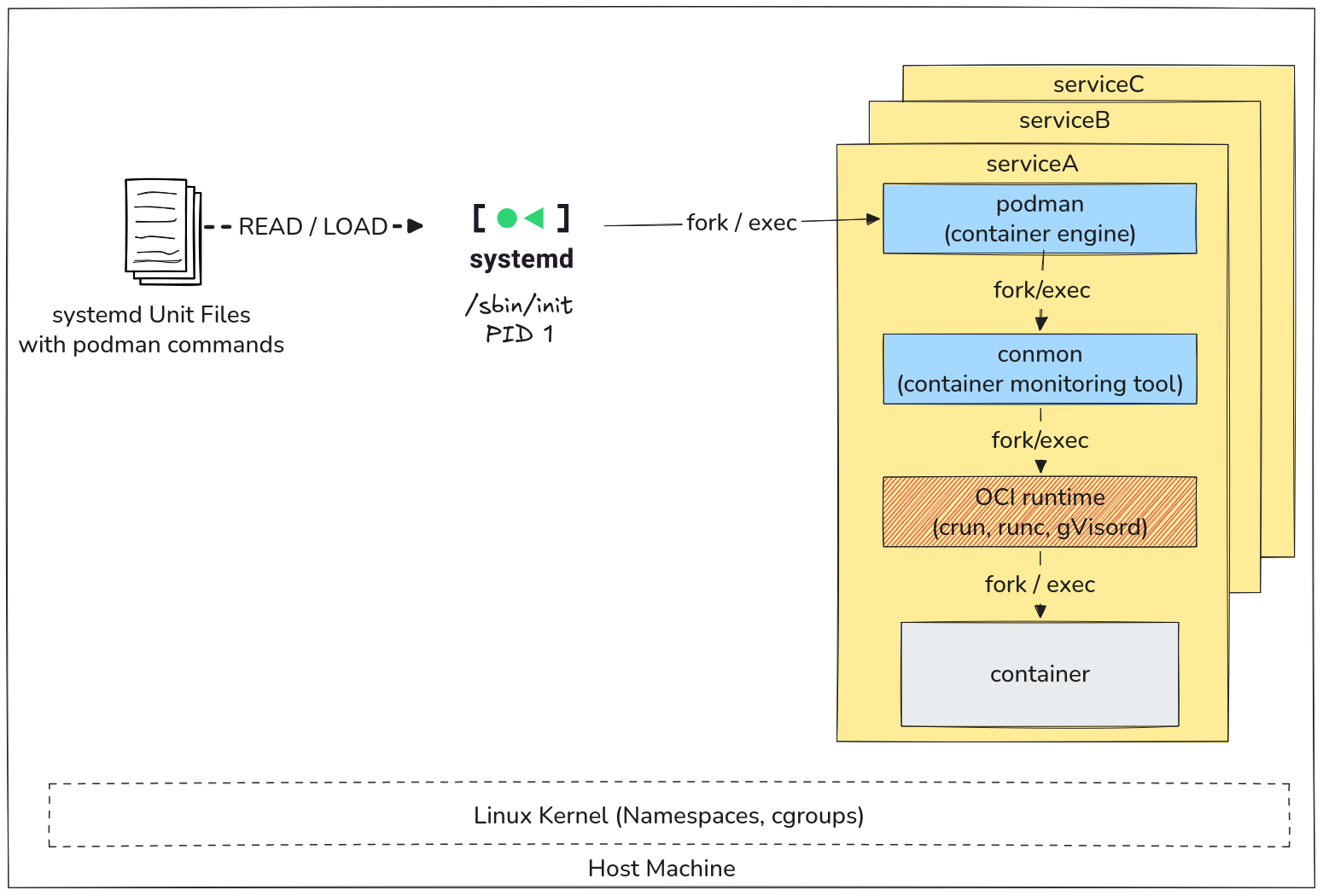
Another learning mechanic I want to try with Shell Gym is spaced repetitions. The tool is fully standalone, but I'm also going to integrate it into the iximiuz Labs platform and create an eponymous content format (Shell Gyms), which will become part of the Daily Practice. When you learn a new command, running it once is not enough. But no matter how many times you run it on day one, the only way to form a durable skill is to repeat the command regularly over a long enough period of time. Good if you have a chance to apply most of the commands in your toolbelt in your day job - but if not, iximiuz Labs will soon be able to help you with the new Shell Gym-powered "spaced" practice. Stay tuned! Dashboard 3.0 - improved navigation and content bookmarkingThe upcoming Shell Gyms required clearing some space in the main dashboard, and the overhaul there was already long overdue. The change is massive, but it's also mainly structural, and I don't really want to spend a lot of time describing the redesign - it's way easier to just see it for yourself: labs.iximiuz.com/dashboard. However, there is one feature I want to emphasize: content bookmarking (a.k.a. "save for later"). I added a new Saved sub-tab for the tutorials, challenges, courses, and skill paths sections of the dashboard where you can quickly access materials you flagged while browsing the catalog(s). Hope it'll come in handy! Fair Pricing - you decide what you pay for the bundle accessThe Summer Skill-Up sale ended two weeks ago, and with it - the sustainable revenue. Which is a shame. I really don't want to run a never-ending sale - it's some dark marketing stuff which I could never tolerate on other sites. But nothing is worse for a business than running out of money. And with the daily revenue of the past two weeks, iximiuz Labs is on a steady course to bankruptcy. So I'm trying something new, hopefully way more transparent and fair. From now on, you decide how much to pay for iximiuz Labs access. The base price is fixed ($299 lifetime, $120/year, or $20/mo), and if your employer expenses it, I would very much like you to pay in full. But if you're paying out of your own pocket, you can choose the discount that makes the price actually work for you. The maximum discount depends on the location (it's PPP-based under the hood), but even in places with the highest income levels, such as the US or Western Europe, you can get up to 40% off. I really hope it'll make iximiuz Labs access affordable for a much wider set of people and also keep the platform afloat. Ask someone else to finish the purchaseThis is more of a convenience feature. You can now pick the plan (monthly, annual, or lifetime), optionally apply a discount, and then, instead of paying for it yourself, generate a payment link and send it to your manager, the finance team, or a friend so they can complete the purchase. Check it out at https://labs.iximiuz.com/pricing?showPlans=1 Community learning materialsJuly was easily the most fruitful month for iximiuz Labs so far! Ten new tutorials, two dozen challenges, and a whole bunch of playgrounds 🚀 Podman series by Shan DesaiPodman Containers with systemd - Podman is a daemonless container runtime, which makes some features (e.g., automatically restarting a container after a host reboot) rather impossible to implement without external help. Luckily, Podman integrates with systemd really well. Check Shan’s post to see a few examples coming from his day-to-day experience of using Podman in an HPC environment.
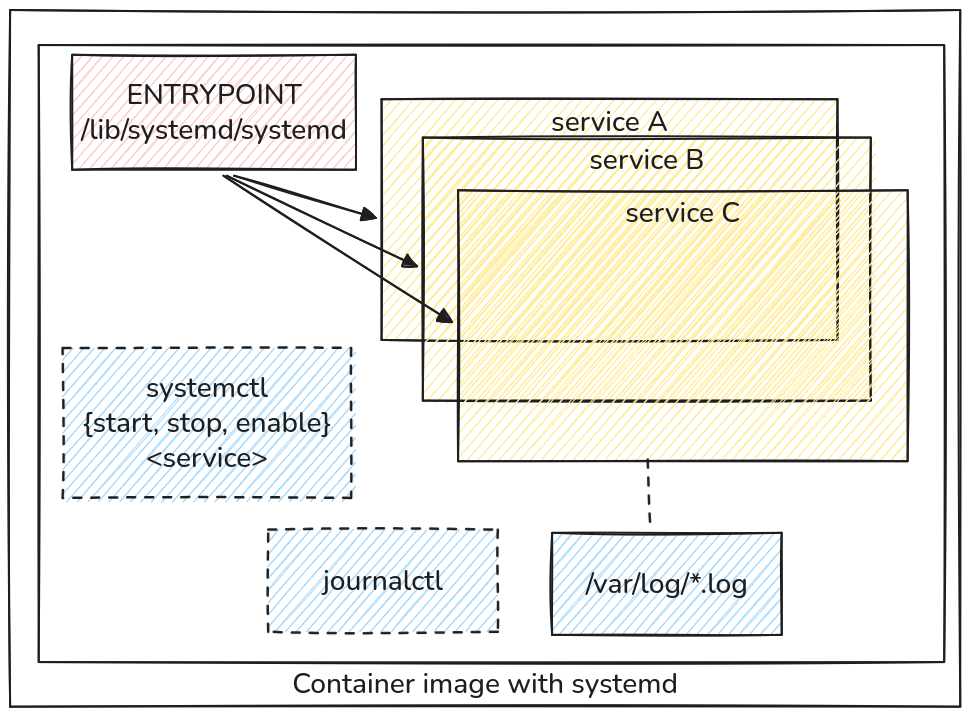
Systemd Inside Containers Using Podman - Everyone knows that it’s hard to impossible to run systemd inside a Docker container. And we just learned that, by its nature, daemonless Podman cooperates with the host’s systemd to implement features that would otherwise require a daemon. But did you know that Podman also makes it easy to run systemd inside a container? This means that with Podman, you can containerize “legacy” apps that were built for running on a regular Linux VM (i.e., not container-native). Read Shan’s post to see how and also catch a few helpful tips and tricks.
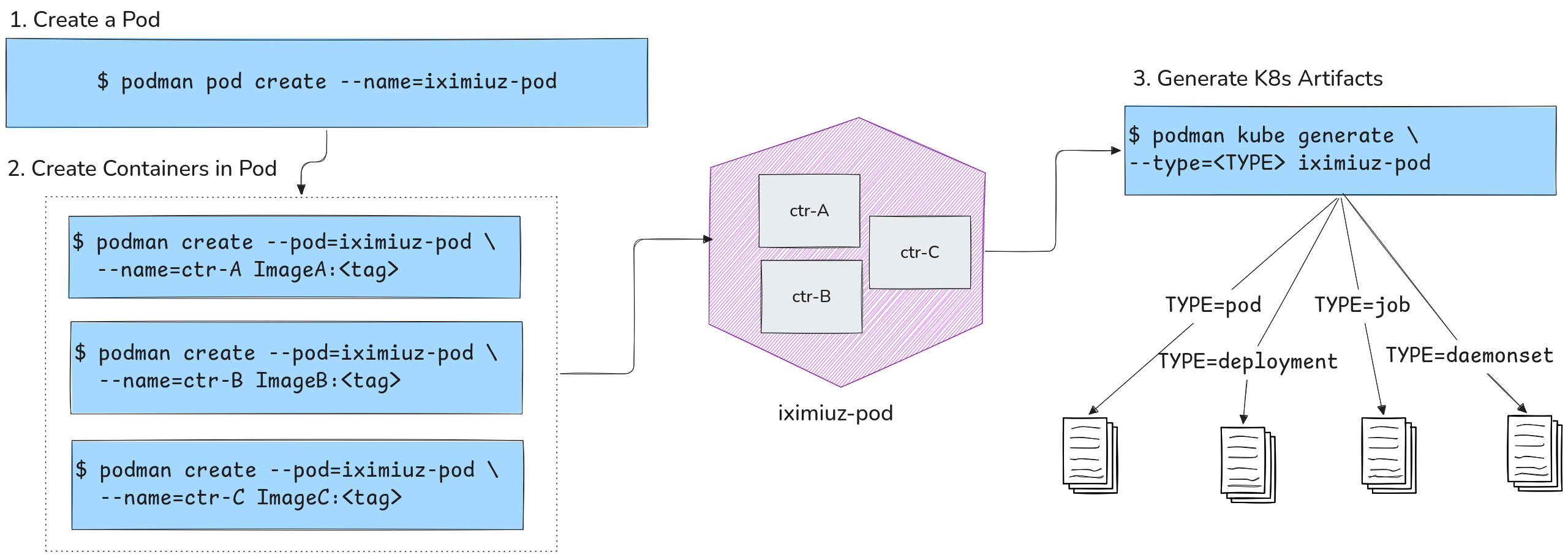
Podman with Kubernetes: Play Before You Apply - Podman’s name suggests the tool was designed to work with Pods, yet the first Podman use cases that come to mind are replacing Docker (i.e., running containers). In this highly hands-on and well-illustrated tutorial, Shan shows how to use Podman to actually create and run Kubernetes-like Pods. The article also touches upon Quadlets - Pod-like constructs controlled via systemd and shows how to generate Kubernetes manifests from Podman’s Pods and vice versa - “play” existing Kubernetes Pod and Deployment manifests in Podman.
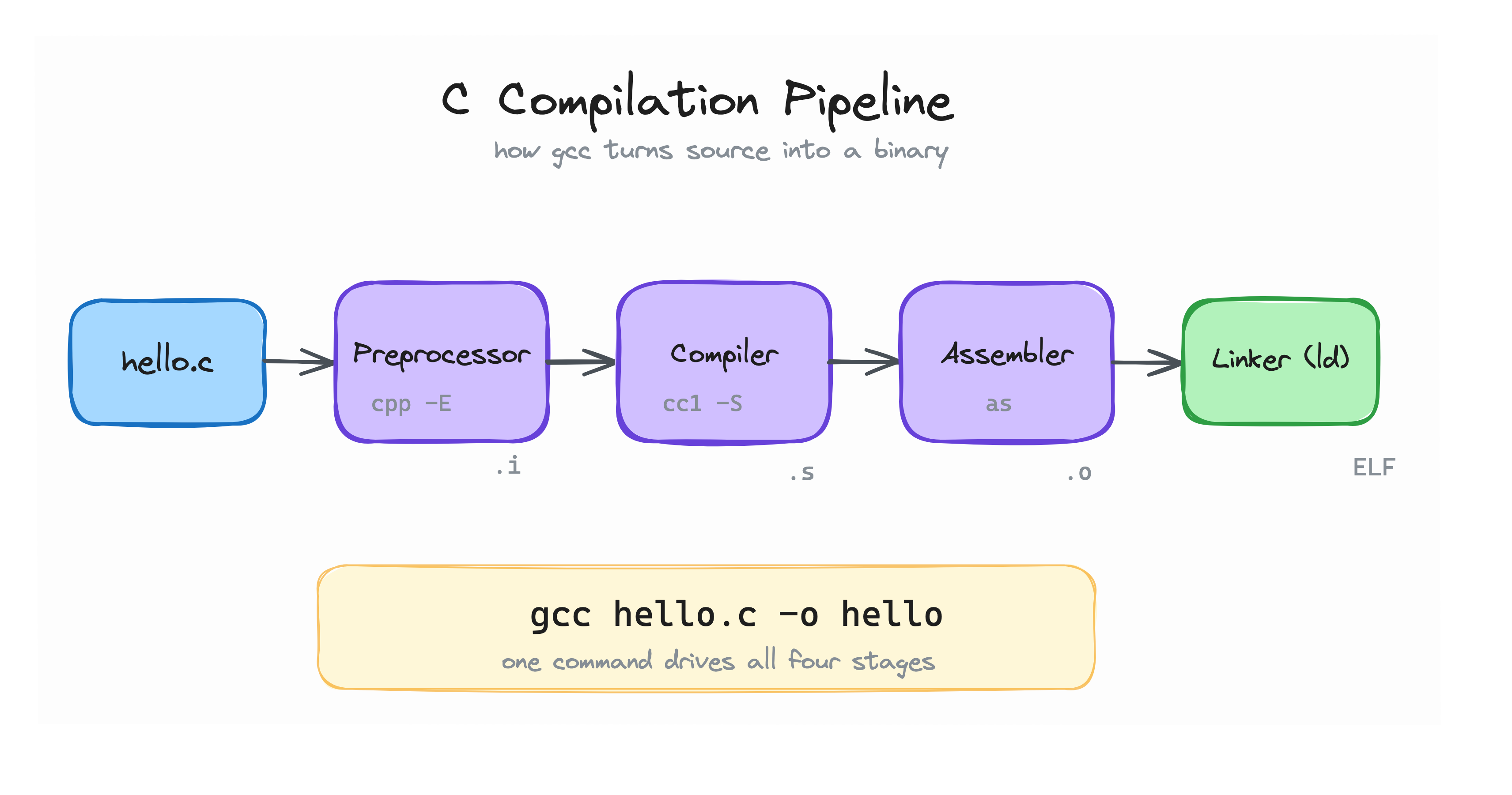
System Programming 101 by Başar SubaşıWriting a (valid) C program without main() - the article’s main value is in the thought process it outlines, not in the actual main-less program it creates in the end. It’s an important learning experience, especially for folks who’re just starting with Linux and programming. And don't forget to solve the hands-on challenges Başar prepared and check the follow-up post: Bare-metal programming: Write your first Assembly program.
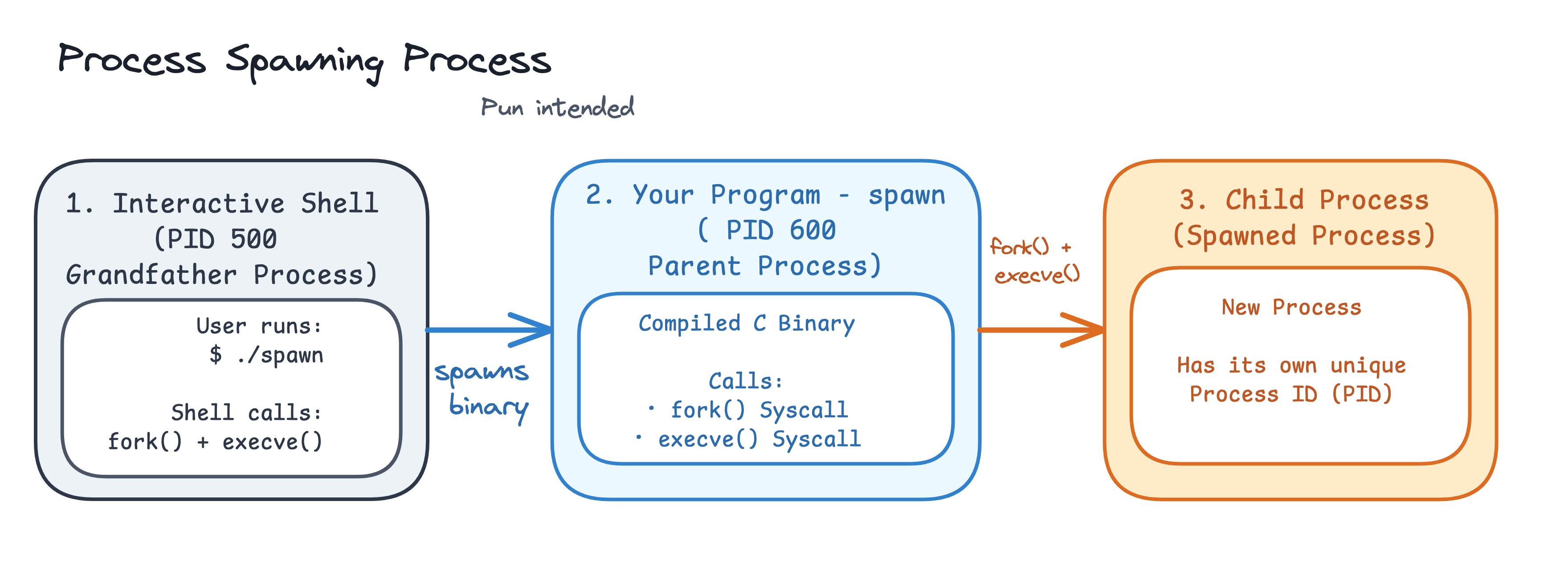
Linux Processes: From a Program to a Process - this post reminds me of the very first blog post that I published on
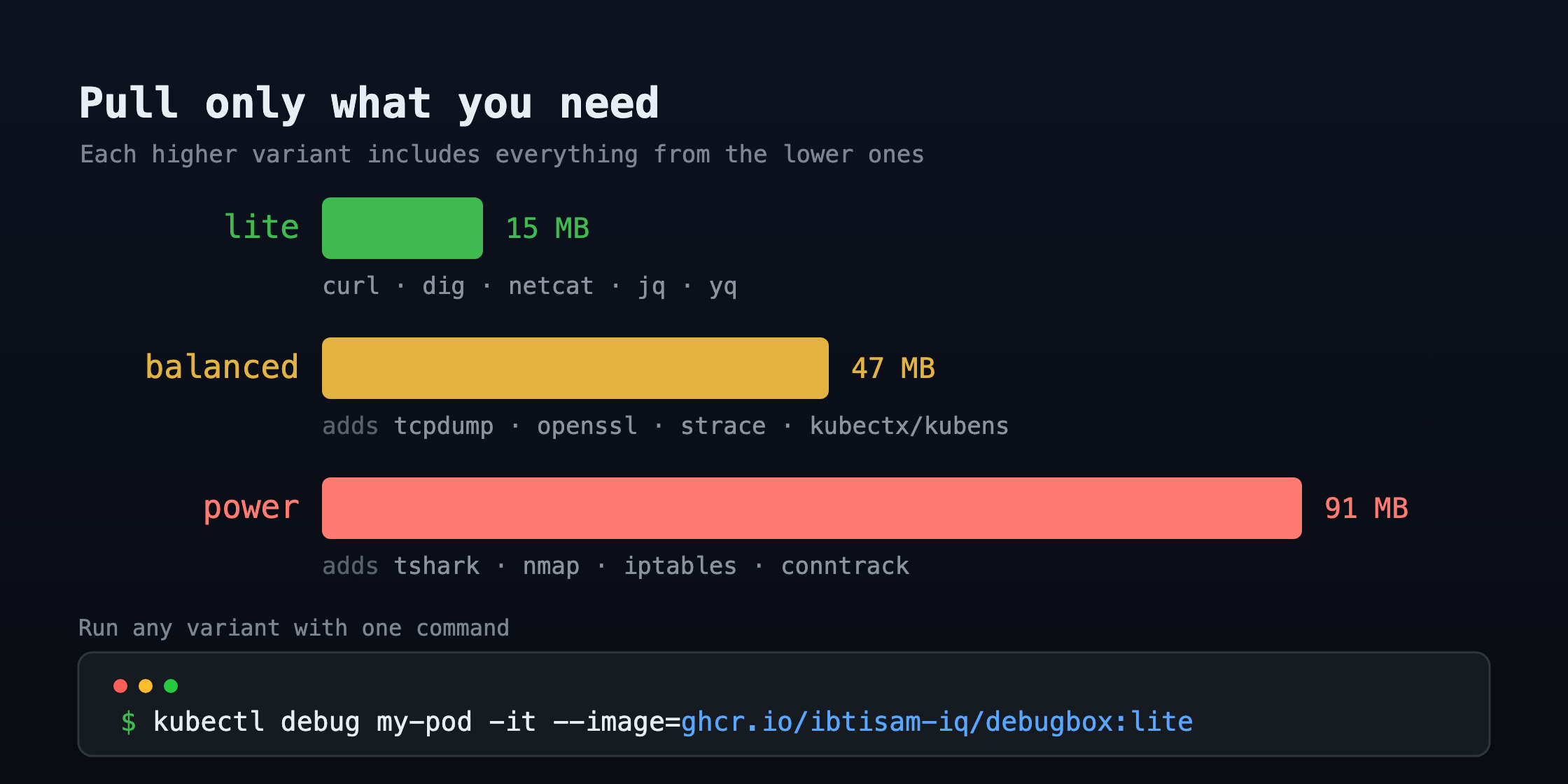
Kubernetes Debugging materials by Muhammad IbtisamKubernetes Debugging with DebugBox: Right-Sized Containers for Every Scenario - One of my favorite Kubernetes features is
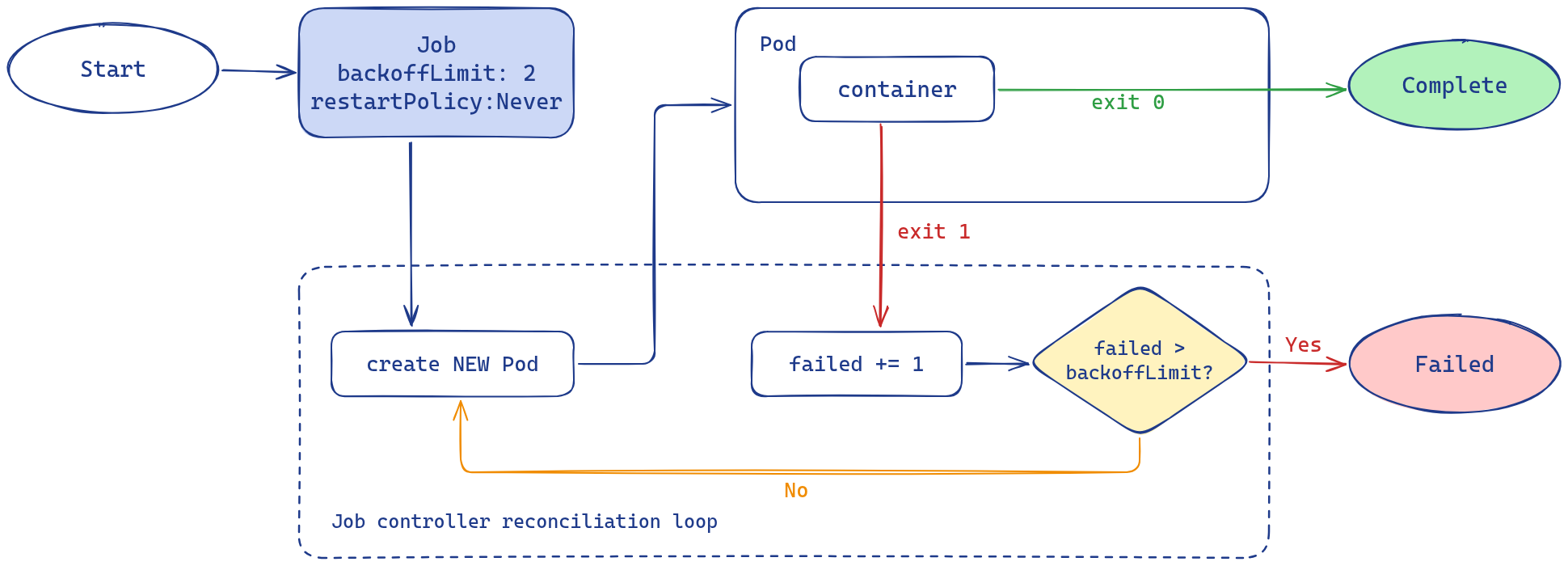
Kubernetes Workload Types Skill Path by Kaloyan Preslavski
CKA/CKAD/CKS-styled challenges by Omkar Shelke
Materials by software vendorsThe number of companies that decided to cover their products and/or solutions on iximiuz Labs keeps growing! 🚀 Got a product to talk about? Drop me a message! ControlPlaneA new vendor joined iximiuz Labs in July - ControlPlane - the team behind the enterprise distributions of FluxCD and OpenBao 🔥 And a new vendor (usually) means new learning materials!
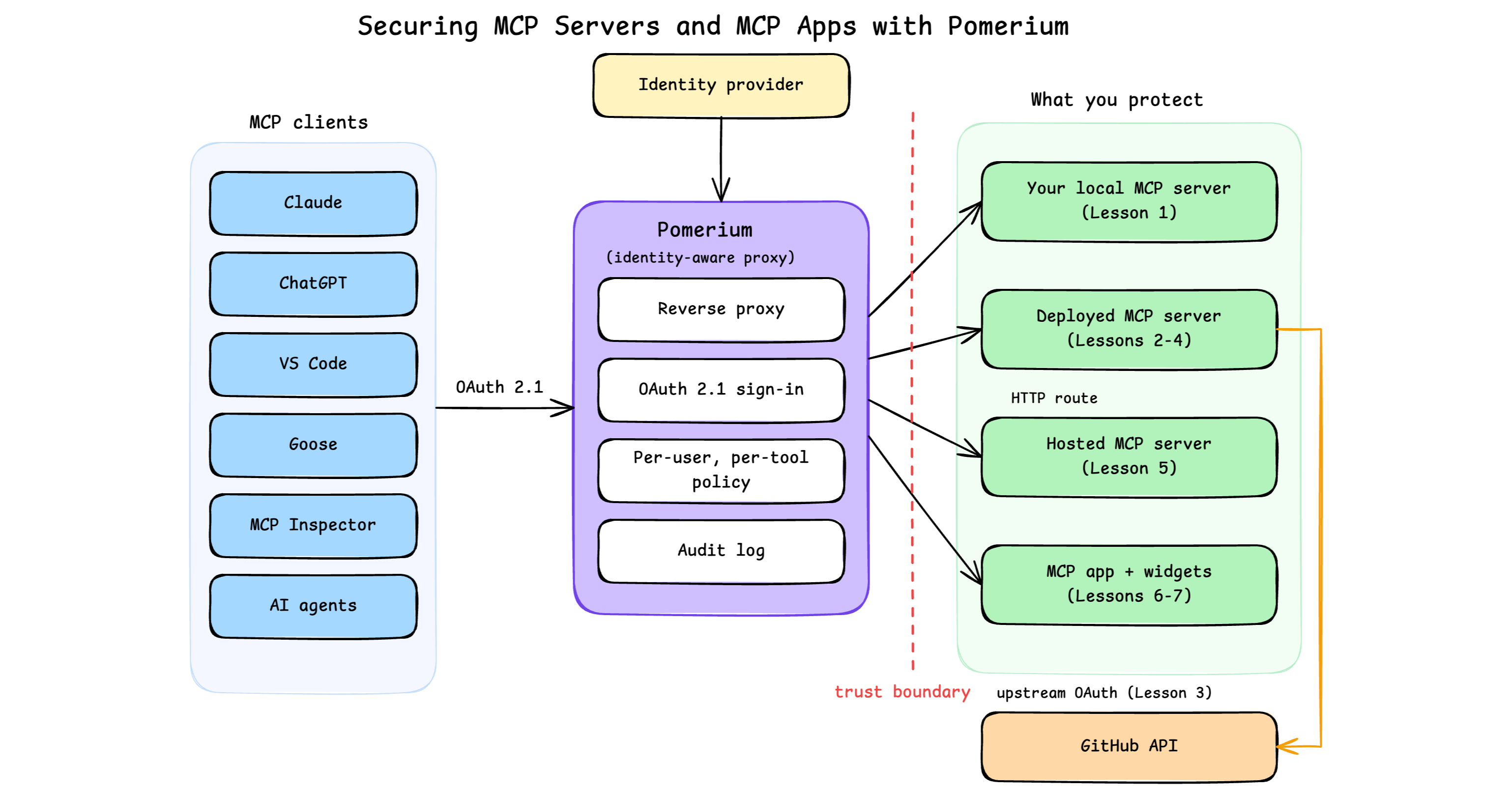
PomeriumPomerium has been with iximiuz Labs for a while now, and Nick Taylor has continued to cover their cool identity-aware access proxy with stylish diagrams and clear writing. Securing MCP Servers and MCP Apps with Pomerium - A hands-on course on securing Model Context Protocol (MCP) servers and MCP apps with Pomerium, covering OAuth 2.1, upstream OAuth to APIs like GitHub, and per-user, per-tool authorization from dev to production.
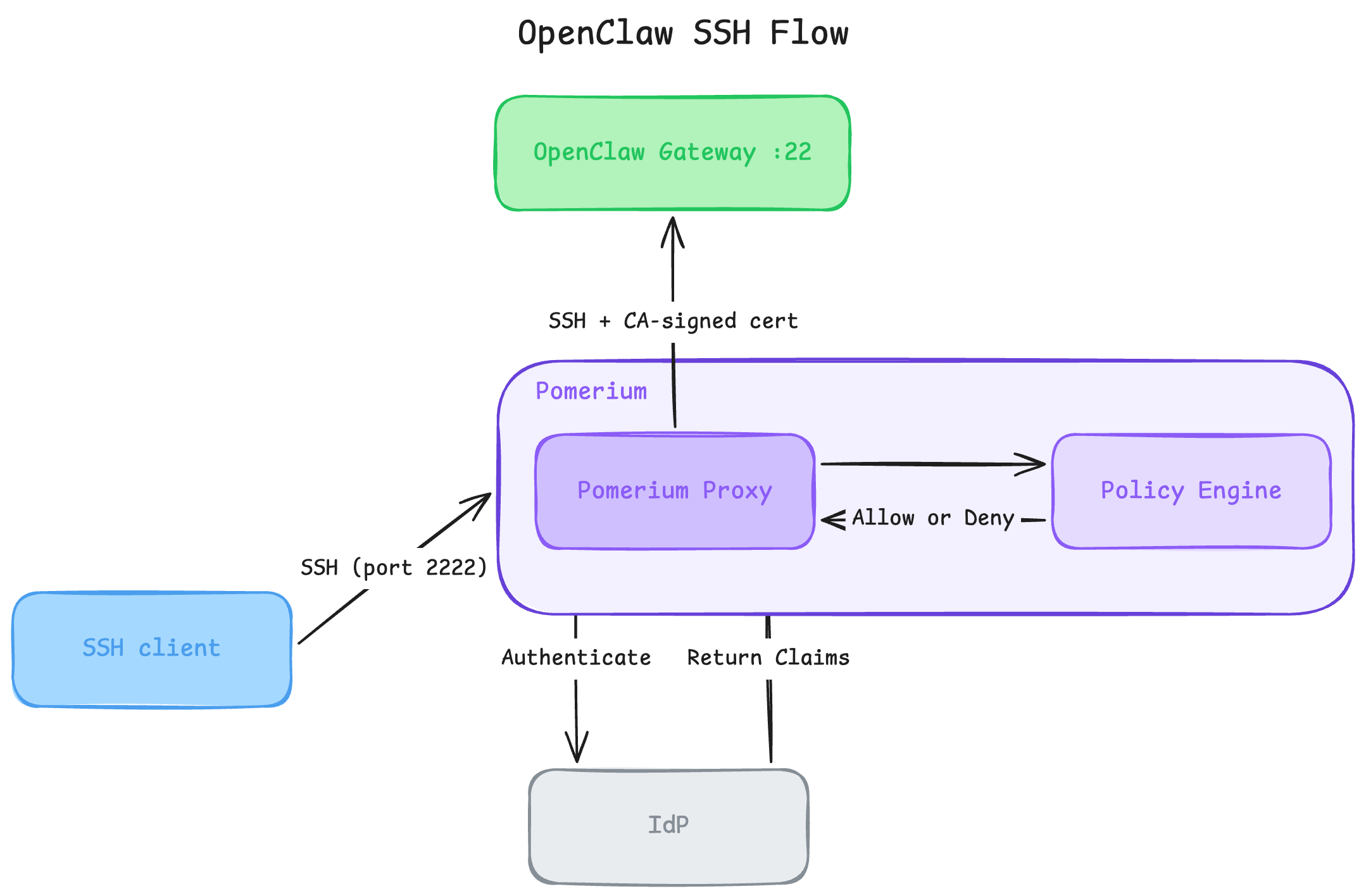
Harden Access to OpenClaw with Pomerium - A tutorial on how to put OpenClaw, a self-hosted AI assistant with shell and file access, behind a web route and an SSH route, both gated by the same identity and Pomerium's context-aware policy.
Good readsThe feedback loops behind Kubernetes by Fatih Arslan of PlanetScale - An enjoyable read for people starting to work with Kubernetes operators. The post opens with an understandable problem - how to automate an operation of a production database (one primary and two replicas) - and a simple and wrong solution that relies on a bunch of bash scripts. Then gradually moves toward a more complex but also more reliable alternative - an operator (a.k.a. controller) that knows the desired state of the DB, watches the actual state, and constantly tries to bring one closer to the other, applying level-triggered logic activated by edge-triggered events. Fatih also dives into the internals of the controller runtime that make these operations more efficient (or even possible at scale) and highlights a whole bunch of pitfalls and gotchas that one will definitely stumble upon in production. Kubernetes Finally Has User Namespace Support. The Shared Kernel Problem Remains (and its spinoff on The New Stack) by Kaylin Trychon of Edera - I finally ran into a take on user namespaces that resonates with my own view of the problem. The article focuses on Kubernetes, but the pitfalls of user namespaces it reveals are relevant for other runtimes, too. Kubernetes, rootless Podman and Docker, Bubblewrap, and the like runtimes and sandboxes that claim improved isolation through using user namespaces may actually be opening an even bigger attack surface. There are 3 main vectors for a container breakout: an operator error (a misconfigured runtime or overly privileged container), a vulnerability in the container runtime itself, or a kernel vulnerability. User namespaces help to mitigate the first two - if a breakout happens, the escaped process will likelier end up having some high & unprivileged UID/GID on the host. However, holes in the kernel itself that can lead to a container breakout aren’t rare either - GhostLock, Copy Fail, Dirty Frag, Fragnesia, IPv6 Frag Escape, to name a few found in the past 6-12 months. The more of the kernel surface you expose to your containers, the greater the chance that such a hole can be exploited by the containerized app (especially if it’s an autonomous agent smart enough to chain several vulnerabilities together). And user namespaces increase the kernel surface exposed to the container by over 200%. Worse, exploiting kernel vulnerabilities usually leaves the attacker with root on the host. Edera’s recommendation (and solution) is to use a hypervisor if strong isolation of workloads is required. With a hypervisor, each workload will reside in its own VM and get a dedicated kernel. But some hypervisors are more bulletproof than others, so you need to choose carefully! For instance, iximiuz Labs uses Firecracker and Cloud Hypervisor, and both were recently affected by guest-to-host breakout vulnerabilities (see a KVM-wide Januscape vulnerability and Cloud Hypervisor’s CVE-2026-45782). Given iximiuz Labs’ focus on edu scenarios and explicit discouragement of processing any sensitive data in the playgrounds, Firecracker and Cloud Hypervisor still remain optimal choices for us. However, for more sensitive workloads, Edera’s approach of using its own Tier-1 hypervisor will likely be a much better choice. P.S. I have no association with Edera. Kubernetes 1.36: User Namespaces Are Finally GA – And Why It Matters for Tenant Isolation by Saiyam Pathak - To use or not to use user namespaces is an orthogonal question to how they actually make rootless containers possible and what kernel and cluster versions support them. If you decide that in your particular situation user namespaces bring more upsides than downsides, this colorful dive by Saiyam will help you understand the magic behind the technology and show which parts of the cluster to check to assess the level of support (spoiler - you’ll need a rather fresh Linux kernel). Podman and Linux Namespaces by Shan Desai - I already shared it in the previous newsletter, but since we’re paying so much attention to user namespaces today, this iximiuz Labs tutorial by Shan complements the picture really well by looking at how Podman applies user namespaces to enable rootless containers. The same UID/GID mapping mechanism and the same set of pros and cons, but this time it’s used by our favorite daemonless runtime. https://www.openwall.com/lists/oss-security/2026/07/06/7 - apparently, VMs and microVMs aren’t safer than containers this week - at least those that expose What is Firecracker? by Kyle Jeong of Browserbase - I was a little hesitant about whether to include this article in the newsletter because of a bunch of technical inaccuracies in it. It makes it sound like a hypervisor is a capability of the OS (Linux’s KVM is, but there are other types of hypervisors, too, that sit right on top of the hardware). It also sometimes confuses a VMM (i.e., the runtime) with a VM (i.e., the box), and it claims QEMU needs > 5s to boot and Firecracker only needs 125ms, while in actuality you can boot QEMU VMs in under 0.5s, too, and Firecracker’s famous ultra-performance is only possible with extremely stripped bare-bone kernels, which are only good for limited serverless workloads (while for agent sandboxes you’ll need something more fully-fledged, so the boot perf of QEMU and Firecracker will likely be on par). But the article does a really good job visualizing Firecracker’s boot process via both code snippets and dynamic visuals, and for this alone it’s already worth checking. And for a more technically accurate Firecracker overview, I recommend this post by Fly.io. proxy_pass with netcat: Pipes, FIFOs, and the Art of Process Plumbing by MedUnes - A brilliant write-up of one person’s experience while solving a simple port forwarding challenge on iximiuz Labs. Instead of following the hints and/or sneak peeking at the solution, they dove into man pages and explored what actually How can AI enable real learning? - a compilation of recent research results on the effect of using AI for learning. TL;DR: It can be as helpful as dangerous. There is no learning without struggle, and with AI it’s too easy to start asking for ready answers, which improves one’s exam performance but decreases problem-solving abilities despite better formal results. However, when AI is used as a personalized tutor, learning experience and effectiveness can be greatly improved - but this requires a proactive effort and, in some cases, knowing how to actually do it. Wrapping upThat is it for July. Definitely didn't expect that much stuff for the usually calm summer month. But this is actually great - it means more and more people discover the labs and find them helpful for learning, experimentation, and building 🚀 Happy hacking! Ivan |


Ivan on the Server Side
A satellite project of labs.iximiuz.com - an indie learning platform to master Linux, Containers, and Kubernetes the hands-on way 🚀