A satellite project of labs.iximiuz.com - an indie learning platform to master Linux, Containers, and Kubernetes the hands-on way 🚀
ServerLabs MCP and the cool use cases it unlocks, the activity log, and other features that landed in August
|
Heya! 👋 It's been a while since I sent the last iximiuz Labs update, so brace for a long release log! Labs MCPYes, I gave in. But before you start throwing stones at me, skim through the use case that the shiny new Labs MCP server unlocks. How to use Labs MCPIt's dead simple, actually. Labs MCP is a remote (HTTP) server. To start using it, you only need to point your AI assistant to its URL and go through a simple OAuth flow it'll trigger: https://labs.iximiuz.com/mcpLabs MCP has already been tested with:
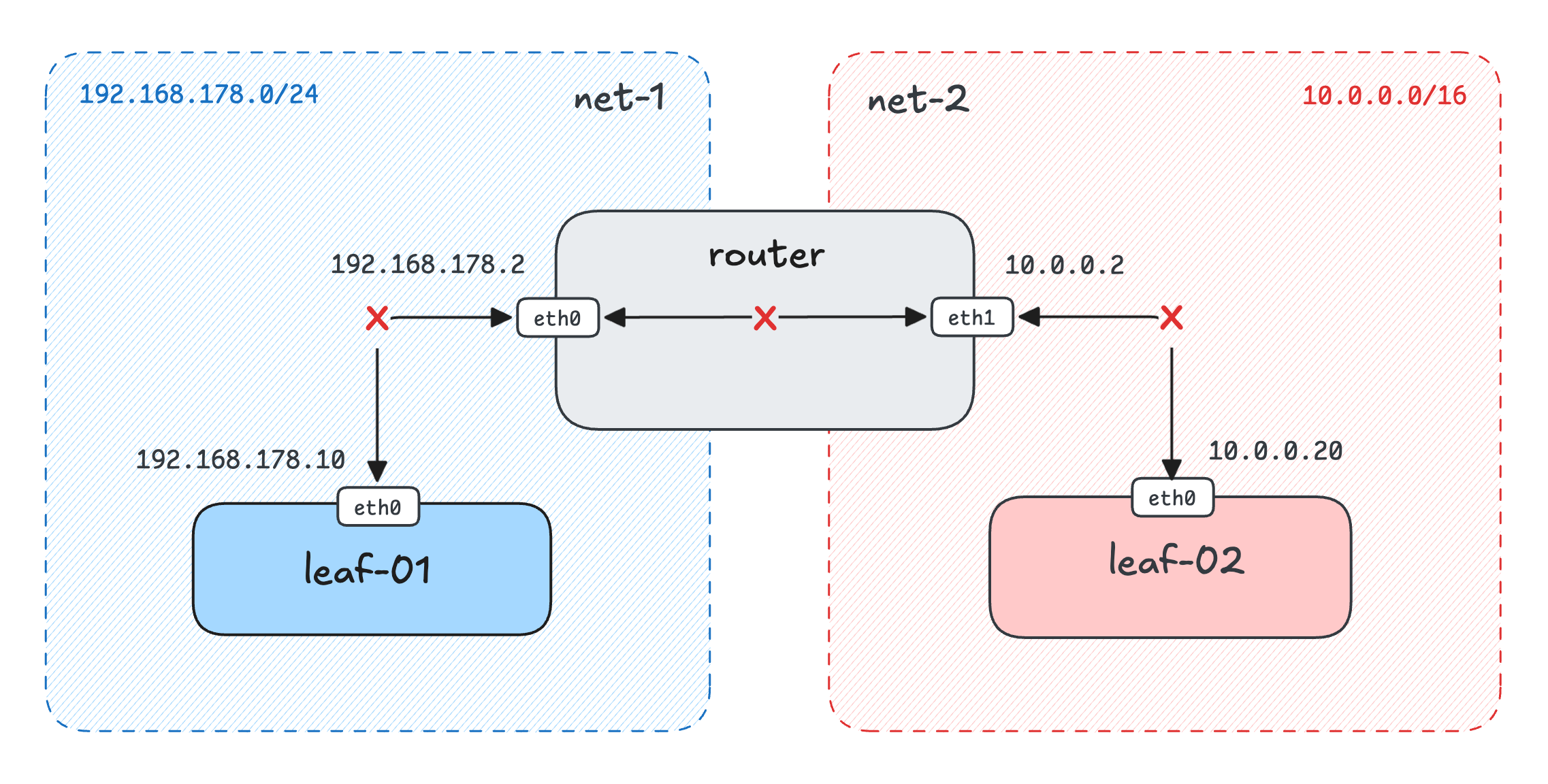
And it likely also works with Gemini, Copilot, Cursor, and even Warp and Zed (docs). Use Case 1: Personalized TutorThis one is kinda obvious. Paired with the recently added site-wide search, Labs MCP lets you request learning paths tailored to your current needs. A simple example: Find me Linux troubleshooting scenarios to practice on iximiuz Labs. No containers or Kubernetes yet, please. Here is what I got from ChatGPT (5.6 Sol High): You can probably achieve the same by playing with the filters and search queries in the catalog, but it's kinda handy to just prompt it. A more involved request: Find me a few Kubernetes challenges on advanced ConfigMap use cases. Claude (Opus 5 High) found these challenges for me, and they are a solid match! Such results are way harder to reproduce with the plain catalog search because not every challenge that mentions ConfigMap actually primarily focuses on ConfigMap manipulations (and that's what we're looking for here). So a bunch of intelligent analysis that Claude put on top of full-text search was very much needed. But the Personalized Tutor is not limited to search! With Labs MCP, you can now ask your favorite AI assistant to help you with a course lesson, tutorial, or challenge if you got stuck with a particular task or on a particular section: I'm stuck with this iximiuz Labs challenge. Help me out. Notice how I didn't even mention the exact challenge. ChatGPT was smart enough to list all currently running playgrounds first, find which one corresponds to a challenge, then read the challenge and the task statuses and provide the feedback (without revealing the solution - it's part of the tool description): All of the above scenarios were done right on chatgpt.com and claude.ai using the plain chat mode. And of course, they would also work on desktop apps or even on your phone. Case 2: Playground BuilderPreparing a practice environment is an interesting exercise in itself. But sometimes (more often than not), you don't really have time for such a detour and want to jump straight to the target system. And Labs MCP can help with it! Here is a Create a playground with 5 VMs split into two isolated networks. One network should be private (no Internet access), and the other should be public. One of the VMs should sit in both networks and act as a router. Briefly describe the final setup. It took ChatGPT (5.6 Sol High) 3m 24s, but the result is well worth it: The Dual-Network Router Lab playground it created is pretty close to the one I crafted manually (a while ago) for this networking challenge. And ChatGPT also prepared a very helpful description and a walkthrough (which you can find on the playground page).
Another frequent use case is deploying demo applications while learning a certain technology - e.g., the famous Istio's Bookinfo, Grafana's QuickPizza, or Jaeger's HotRod apps:
Deploy the https://github.com/jaegertracing/jaeger HotROD app to a k3s playground and write a brief walkthrough.
Claude Cowork launched right from the web interface (with Opus 5 High) spent about ten minutes on this prompt, but it delivered a rather flawless result - a running K3s playground with a few microservices deployed and Jaeger collecting and visualizing traces: And if you want to reuse the results of such an experiment, you can always ask the AI assistant to save the current playground session as a custom playground with a follow-up prompt: Stop the playground run and save the snapshot as a reusable custom playground. Update the playground manifest to expose the demo app and Jaeger as UI tabs. Place the walkthrough into the playground's description. Here is the playground I've got for the above example: HotROD + Jaeger on K3s. Similar to the dual-network playground, it has a helpful walkthrough on the front page. The Jaeger demo app was already non-trivial, but I also tried Labs MCP on the much larger OTEL demo app, and both Claude and ChatGPT managed to produce a working setup:
Deploy https://github.com/open-telemetry/opentelemetry-demo to a k3s playground and write a brief walkthrough.
The OTEL app needs over 15GB of container images, and it took about 30 minutes for the agent to set it all up end-to-end, but since it all happened without my involvement, I count it as a rather huge win. And it's also proof that the Labs MCP's design allows agents to work on long-running, multi-step tasks, which may require debugging along the way. Playground Builder is a more advanced use case, so you'll want to use the work/cowork mode of ChatGPT/Claude (either via the web interface or the desktop app). In most cases, chat mode won't cut it because the single context window fills up quickly, especially when the model has to keep large Kubernetes and playground manifests right in its context. Of course, Claude Code, Codex, OpenCode, or the like, when paired with Labs MCP, will nail it, too. Case 3: Remote infrastructure for your agentsOftentimes, an agent runs in a tiny container, a constrained runtime, or a fully featured VM, but with the wrong kernel and/or Linux distro version. And yet you need this agent to author a shell script that can certainly work on all mainstream Linux distros, or deploy and test an application that can only reveal its cracks on a real multi-node Kubernetes cluster, or debug some involved tech that cannot be launched in the agent's sandbox (e.g., gVisor, Kata containers, or eBPF). iximiuz Labs is not in the agent sandboxing market, and even with Labs MCP, I expect agents and AI assistants to run outside the playgrounds it controls. But where do iximiuz Labs playgrounds fit nicely is providing realistic remote infrastructure for agents to run and test the software they work on. And with Labs MCP, it becomes rather easy. A simple example - pair your coding agent with Labs MCP and say: This script works on Ubuntu but fails on Fedora. Test it across the mainstream Linux playgrounds and make it portable. A more advanced use case is using iximiuz Labs VMs as execution environments to build, develop, or investigate something.
Using the K3s playground, clone the https://github.com/kubernetes-sigs/agent-sandbox repo and deploy its OpenClaw + gVisor example. Expose OpenClaw with a public URL. Briefly explain the final setup and how to use it.
Another typical multi-agent thing you can enhance with Labs MCP is git worktrees. They isolate source trees, but not ports, databases, or dev servers. You can mitigate it to some extent with local containers, but the dev machine's capacity can quickly become a problem. With Labs MCP, you can let different branches - or different agents - use separate remote environments instead of competing for the same laptop. Deploy these three feature branches independently and give me a URL for each one. Last but not least, I've been talking about the bug reproduction use case for a few years now, but with agents it's become so simple that there is no excuse for not leveraging it. Ask the agent to clone a repository, check out the exact commit, reproduce the failure, and preserve the resulting machine state. Such a repro can persist beyond the agent session and be reopened later, rather than being reduced to a (questionable) list of reproduction steps. Check out commit 8ac21f, reproduce issue #423, and save the working repro as a reusable playground. Similar to the Playground Builder use case, to benefit from the remote infrastructure capabilities of iximiuz Labs, you will want to use either the work/cowork mode of ChatGPT/Claude or connect Labs MCP straight to your CLI coding agent. How Labs MCP worksLabs MCP is a stateless remote MCP server that implements the recently released 2026-07-28 Specification (a.k.a., MCP 2.0). From the caller's perspective, it's just a single JSON-RPC endpoint that handles "tools/call" requests: Since it's stateless (thanks to the new spec), the implementation of this endpoint is no different from any other endpoint served by the iximiuz Labs API server. This simplification was the primary reason I decided to give it a shot. If you've never implemented a remote MCP server before, you might think it requires some special AI engineering skills. In actuality, most of the problems I had to solve while implementing it were the good old server-side engineering - adding OAuth authentication (probably the biggest lift), sizing requests and tweaking timeouts for the upstream system calls, refactoring existing business logic to make it usable by both the existing API endpoints and the new MCP tools (e.g., the start_play tool from the above example invokes the same handler as the POST /api/plays endpoint), etc. But some "AI engineering" still happened. I shipped a working PoC in less than a day (thanks to Claude Code & Fable). But the path from the PoC to a usable MVP took almost two weeks. While almost all tools in the PoC technically worked, the initial tool set, input and output schemas, and tool descriptions yielded rather suboptimal results when I tried pointing ChatGPT and Claude at the new MCP server. None of the above Personalized Tutor, Playground Builder, and Remote Infra prompts produced meaningful output with the original version of the MCP server. Some examples:
Things like that are virtually impossible to catch with automated testing. You can only spot them while using the product to solve real problems. And only once you spot & fix them can you (and should) cover them with tests so the implementation doesn't regress. The gap between a PoC and an MVP remains huge, and it's one of the key reasons I don't believe claims that "software development" has been solved. Activity
|
Authentication via Google and GitLab
Last but not least. It has recently become possible to sign in/up on iximiuz Labs via Google and GitLab. GitHub lock-in is no more!
For existing users, it is also possible to link the labs account to a new or alternative login method on labs.iximiuz.com/account.
GitHub's recurring unavailability has been a great motivator.
 |
Wrapping up
August was a weird month for iximiuz Labs. Signups and playground usage are up compared to June and July. But the revenue is significantly down - way below the sustainability level. To stimulate things a bit, I'm running the Fair Pricing pilot - you can pick your discount, no questions asked. If you've been considering upgrading your membership, now is a good time to both support the labs and get a good deal: https://labs.iximiuz.com/pricing
Happy hacking,
Ivan
Ivan on the Server Side
A satellite project of labs.iximiuz.com - an indie learning platform to master Linux, Containers, and Kubernetes the hands-on way 🚀